
User`s manual



6-17
6
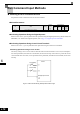
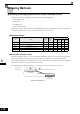
Using the DC Injection Brake
The DC injection brake can be used to stop a coasting motor before restarting it or to hold it at the deceleration
end when the inertia is large. Set parameter b2-03 to apply DC injection to the motor, before it starts to accel-
erate. Set parameter b2-04 to apply a DC injection brake to the motor at stopping.
Setting b2-03/04 to 0 to disables the DC injection brake at start/stop.
Set the DC injection brake current using b2-02.
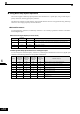
Related Parameters
Multi-function Digital Inputs (H1-01 to H1-05)
Inputting the DC Injection Brake Command from Control Circuit Terminals
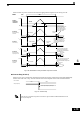
If you set a digital input terminal (H1-) to 60 (DC injection brake command), the DC brake can be applied
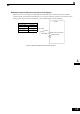
by enabling or disabling this input. The time chart for the DC injection brake is shown below.
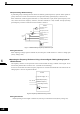
Fig 6.20 DC Injection Brake Time Chart
Parameter
No.
Name
Factory
Setting
Change
during
Opera-
tion
Control Methods
V/f
V/f with
PG
Open
Loop
Vector
Closed
Loop
Vector
b2-01 Zero speed level (DC injection braking starting frequency)0.5 HzNo AAAA
b2-02 DC injection braking current 50% No A A A No
b2-03 DC injection braking time at start 0.00 s No AAAA
b2-04 DC injection braking time at stop 0.50 s No AAAA
Set
Value
Function
Control Methods
V/f
V/f
with
PG
Open
Loop
Vector
Closed
Loop
Vector
60 DC injection brake command Yes Yes Yes Yes
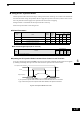
If you input the DC injection brake command from an external terminal, and if a run command
or jog command is input, the DC injection brake will be disabled, and operation will resume.
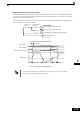
DC injection brake command
FRUN
Output frequency
DC injection brake
DC injection brake
E1-09
b2-01