
User`s manual





6-18
6
Changing the DC Injection Brake Current Using an Analog Input
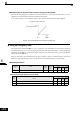
If you set H3-09 (Analog Input Terminal A2 Function Selection) to 6 (DC injection brake current), you can
change the DC injection brake current level using the analog input.
At 10 V input (voltage) or 20 mA input (current), 100% of the Inverter rated current will be applied.
Fig 6.21 DC Injection Brake Current Using an Analog Input
Using an Emergency Stop
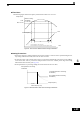
Set a digital input terminal (H1-) to 15 or 17 (emergency stop) to decelerate to stop using the emergency
stop deceleration time set in C1-09. If inputting the emergency stop with an NO contact, set the multi-function
input terminal (H1-) to 15, and if inputting the emergency stop with an NC contact, set the multi-function
input terminal (H1-) to 17.
After the emergency stop command has been input, operation cannot be restarted until the Inverter has
stopped. To cancel the emergency stop, turn OFF the run command and emergency stop command.
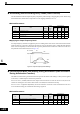
Related parameters
Multi-function Digital Inputs (H1-01 to H1-05)
Parameter
No.
Name
Factory
Setting
Change
during
Opera-
tion
Control Methods
V/f
V/f with
PG
Open
Loop
Vector
Closed
Loop
Vector
C1-09 Emergency stop time 10.0 sNo AAAA
Set
Value
Function
Control Methods
V/f
V/f
with
PG
Open
Loop
Vector
Closed
Loop
Vector
15 Emergency Stop, NO contact Yes Yes Yes Yes
17 Emergency Stop, NC contact Yes Yes Yes Yes
DC injection brake current level
Inverter rated current