
User`s manual



6-70
6
Trim Control Increase/Decrease Command and Frequency Reference
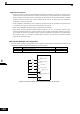
The frequency references using Trim Control Increase/Decrease command ON/OFF operations are shown
below.
Application Precautions
• Trim Control Increase/Decrease command is enabled when speed reference > 0 and the speed reference
source is an analog input (A1 or A2).
• When the (analog frequency reference value - d4-02) < 0, the frequency reference is set to 0.
• If only one of the Trim Control Increase command or Trim Control Decrease command has been set for a
digital input terminal, operation error OPE03 (invalid multi-function input selected) will occur.
Frequency Reference
Set Frequency
Reference
+ d4-02
Set Frequency
Reference
- d4-02
HOLD
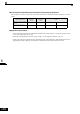
Trim Control Increase Command
Terminal
ON OFF ON OFF
Trim Control Decrease Com-
mand Terminal
OFF ON ON OFF