
User`s manual



6-71
6
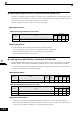
Hold Analog Frequency Using User-set Timing
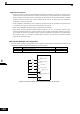
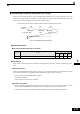
When one of the parameters H1-01 to H1-05 (digital input terminal S3 to S7 function selection) is set to 1E
(sample/hold analog frequency command), the analog frequency reference will be held from 100 ms after the
terminal is turned ON, and operation will continue at that frequency.
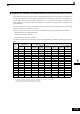
Fig 6.70 Sample/Hold Analog Frequency
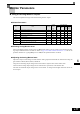
Related Parameters
Multi-function Digital Inputs (H1-01 to H1-05)
Precautions
When setting and executing sample and hold for analog frequency references, observe the following precau-
tions.
Setting Precautions
When using sample/hold of analog frequency reference, you cannot use the following commands at the same
time. Otherwise operation error OPE03 (invalid multi-function input selection) will occur.
• Acceleration/Deceleration Ramp Hold command
• UP/DOWN command
• Trim Control Increase/Decrease command
Application Precautions
• When performing sample/hold of analog frequency reference, be sure to close the digital input for 100 ms
or more. If the sample/hold time is less than 100 ms, the frequency reference will not be held.
• The frequency reference value that is held will be deleted when the power supply is turned OFF.
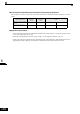
Set Value Function
Control Methods
V/f
V/f
with
PG
Open
Loop
Vector
Closed
Loop
Vector
1E Analog frequency reference sample / hold Yes Yes Yes Yes
Sample/hold
command
Analog input
Frequency reference
The analog value 100 ms after the command is turned ON is used as the frequency reference.