
User`s manual



6-130
6
Digital Operator Functions
Setting Digital Operator Functions
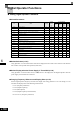
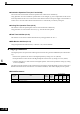
Related Parameters
* Depends on the inverter capacity
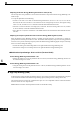
Monitor Selection (o1-01)
Using parameter o1-01 the third monitor item that is displayed in drive mode can be selected. This function
has no effect on the optional LCD-operator (JVOP-160).
Monitor Display when the Power Supply is Turned ON (o1-02)
Using parameter o1-02 the monitor item (U1-) that is to be displayed on the Digital Operator when the
power supply is turned ON can be selected.
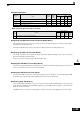
Changing Frequency Reference and Display Units (o1-03)
Set the Digital Operator frequency reference and display units using parameter o1-03. The setting in o1-03
will affect the display units of the following monitor items:
• U1-01 (Frequency Reference)
• U1-02 (Output Frequency)
• U1-05 (Motor Speed)
• U1-20 (Output Frequency after Soft Start)
• d1-01 to d1-17 (Frequency references)
Parameter
No.
Name
Factory
Setting
Change
during
Opera-
tion
Control Methods
V/f
V/f with
PG
Open
Loop
Vector
Closed
Loop
Vector
o1-01Monitor selection 6 YesAAAA
o1-02Monitor selection after power up 1 Yes AAAA
o1-03Frequency units of reference setting and monitor 0 No AAAA
o1-04 Setting unit for frequency reference related parameters 0 No No No No A
o1-05LCD Display contrast 3 Yes AAAA
o2-01LOCAL/REMOTE key enable/disable 1 No AAAA
o2-02STOP key during control circuit terminal operation 1 No AAAA
o2-03 Inverter kVA selection
0
*
No AAAA
o2-04User parameter initial value 0 No AAAA
o2-05Frequency reference setting method selection 0 No AAAA
o2-06Operation selection when digital operator is disconnected 0 No AAAA
o2-07Cumulative operation time setting 0 No AAAA
o2-08Cumulative operation time selection 0 No AAAA
o2-09Initialize Mode 2 No AAAA
o2-10Fan operation time setting 0 No AAAA
o2-12Fault trace initialize 0 No AAAA
o2-13kWh monitor initialize 0 No AAAA