
User`s manual



6-133
6
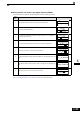
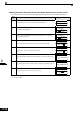
Storing Inverter set values in the Digital Operator (READ)
To store Inverter set values in the Digital Operator use the following method.
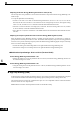
If an error is displayed, press any key to cancel the error display and return to the o3-01 display. Refer to
page 7-15, Digital Operator Copy Function Faults for corrective actions.
Step
No.
Explanation Digital Operator Display
1 Press the Menu Key and select advanced programming mode.
2 Press the DATA/ENTER Key.
3
Press the Increment and Decrement Key until parameter o3-01 is displayed
(Copy Function Selection).
4 Press the DATA/ENTER Key and select the constants setting display.
5 Change the set value to 1 using the Increment Key.
6
Set the changed data using the DATA/ENTER Key. The READ function will
start.
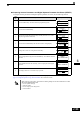
7
If the READ function ends normally, “End” is displayed on the Digital Oper-
ator.
8 The display returns to o3-01 when a key is pressed.
** Main Menu **
-ADV-
Programming
Initialization
-ADV-
A1 - 00=1
Select Language
COPY Function
-ADV-
o3 - 01=0
Copy Funtion Sel
Copy Function Sel
-ADV-
o3
-01= 0
COPY SELECT
*0*
Copy Function Sel
-ADV-
o3
-01=
1
*0*
INV OP READ
READ
-ADV-
INV OP
READING
READ
-ADV-
READ COMPLETE
Copy Function Sel
-ADV-
o3
-
01=0
COPY SELECT
*0*