
User manual

© 2011 Racktivity NV 105/160
Antwerpsesteenweg 19 - 9080 Lochristi - Belgium - www.racktivity.com v 2014.5.14
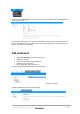
Select the option edit page from the actions menu to edit the page and put information that is
relevant for the user
By editing the page the user can customize a full page by entering data in markup format. If a
page is created the user can use html5 code to add some graphs or other available data. Free
text can be added by using Markup.
Add dashboard
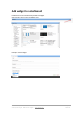
Select new dashboard from the actions menu
Add Name and Title
Parent: parental page for the dashboard
Visibility: per user or global
Order: ordering the page tree (1-2-3…)
A created dashboard becomes available in the page tree.
It is also possible to add the new dashboard to an existing page or new page.
Example: dashboard1 added to main user page