
User manual

© 2011 Racktivity NV 31/160
Antwerpsesteenweg 19 - 9080 Lochristi - Belgium - www.racktivity.com v 2014.5.14
Configure a HTTPS access on DCPM
To generate a HTTPS access on DCPM below instructions need to be added in the root on the
server terminal.
Make sure you are in the installation package folder of DCPM.
cp scripts/nginx-https-setup.py /srv/chroot/dcpm
press enter
now type the following
chroot /srv/chroot/dcpm
press enter
next is the following command:
python nginx-https-setup.py country=US state=Arizona city=Atlanta organization=Org unit=Unit
domain=dcpm.com
where:
Country= your country name
State= State name
City= City name
Organization= organization name
Unit= company unit name (eg. Operations, Sales)
Domain= your domain name
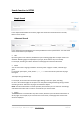
Below a screen shot of the configuration.