
User's Manual





Heater roller
If the paper twists around the heater roller, its laminate may stick to the
heater roller. If this happens, clean the heater roller to remove the attached
laminate.
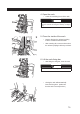
1. Open the heater roller.
2. Clean the heater roller.
Remove dirt from the heater roller •
using the heater roller cleaning brush
(provided). Clean it while rotating it by
pressing the [Heater Roller RW] switch.
CAUTION
Do not touch the surface of the heater roller as its
surface becomes very hot.
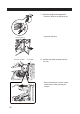
3. Close the heater roller.
Open the heater roller and then •
remove the packing paper.
Then remove the last hopper.•
Then attach the last hoper. •
Route the packing paper before •
closing the heater roller.
82