
Owner`s manual

12
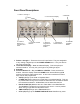
• HEADPHONE (F6) brings up the selected HEADPHONE matrix menu.
• MENU advances the screen to the next menu. This is the same as touching
the STATUS button in any menu.
• ENTER confirms data entry.
5. Transport Control Buttons provide Record, Play and Stop functions when Deva
is in NORMAL OPERATING mode.
6. Numeric Keypad and Backspace Buttons provide an alternative means of
entering numeric data such as Time Code and Meta-Data.
7. Headphone Volume Control
8. Slate Mic Activation Button is a ‘push and hold’ button that activates the slate
mic. Routing is done via the DISK MIX menu.
Left Side Panel Descriptions
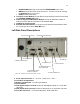
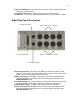
11: Battery Compartment
12: Power Switch
9: Power Input Connector 10: Hard Drive Compartment
14: AES Digital Input, 4
Pairs, 8 Channels
13: AES Digital Output,
4 Pairs, 8 Channels
15: Fire Wire Port
16: Serial / RS422 Port
17: Time Code I/O
18: USB Port
* Note: Ref 1 and Ref 2 connectors are currently un-used
9. Power Input Connector 10 – 16 v DC, 1 Amp, Pin 4 +, Pin 1 –
10. Hard Drive Compartment
11. Battery Compartment – For NP1 type batteries.
12. Power Switch
13. AES Digital Output Connector 4 Pairs of AES Digital outputs on a 15 pin Mini
connector.
14. AES Digital Input Connector 4 Pairs of AES inputs on a 15 pin Mini connector.
15. Fire Wire Connector – for external Hard Drive, DVD or CD drive.