
Owner`s manual
15
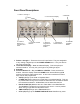
2.3. Headphone Output
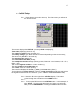
2.3.1. The Headphone output feeds low impedance (100 ohm)
headphones. Headphone routing is done via the HEADPHONE
menu on the MAIN MENU screen. You can also SOLO any channel
into the headphones by TOUCHING (for about 1 second) that
individual meter displayed on the HOME SCREEN. Touching the
headphone section or changing to another menu will revert to the
current headphone selection.
2.4.
Digital Inputs:
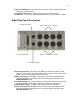
2.4.1. DEVA 5 has 8 AES Digital Inputs available on a DB15 mini
Connector.
2.5. Digital Outputs:
2.5.1. 8 AES Outputs are available on a DB15 mini Connector.
2.6. Sync Inputs:
2.6.1. REF 1 and REF 2 connectors are currently unused. A future video
reference option is planed for these connectors.
2.7.
Time Code Input/Output:
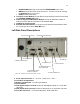
2.7.1. Time Code I/O is available on the 5 pin Lemo connector on the
Left side of the Deva.
2.8.
Fire Wire Input/Output:
2.8.1. A Fire wire connector is available on the Left side of the Deva for
connecting an external Hard Drive or DVD/CD device. The status
and control of this device is available under the MY DEVA button in
the MAIN MENU.
2.9.
Serial Connector:
2.9.1. Use this connector to control some of Deva’s functions via the
Cameo or other approved devices. It also allows the Deva to
emulate a Sony video deck in post.
2.10.
USB Port:
2.10.1. Use this port to attach an external control device such as a
keyboard. You can also connect a printer to this port to print out
Meta Data files. Contact Zaxcom for a list of compatible devices.