
Owner`s manual
16
3. Upgrading Deva’s Software:
3.1. Upgrade software will be Emiled to you when a new version is ready. Make
sure that your dealer has given your Email address to Zaxcom for this
service. You must copy the software to a DVD-RAM and insert that disk in
external Fire wire drive. You will be prompted on the Deva screen to
‘UPDATE SOFTWARE?’ Follow the prompts on Deva’s display. Updates
will be supported through the internal DVD disk at a later date
4. Security:
4.1. Deva has a User Customizable Splash Screen. This screen which appears
for 2 seconds on power up can be programmed with the owners name and
any data or photo that will fit in a 320 x 240 BMP file. This screen is
password protected.
4.2. The operation of Deva can also be password protected. The machine will
operate for (X) amount of time before prompting for the password. If the
password is not entered the machine will stop operating. This feature can be
turned on and off by the owner. This means that any stolen Deva will be
rendered useless.
5. Quick Start Guide:
5.1. Power up:
5.1.1. Once the Deva is hooked up as desired and either a battery
inserted or external power connected (or both). Turn ON the power
switch located on the left side next to the battery compartment door.
5.2. Sample Setup Exercise:
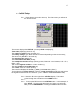
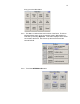
5.2.1. DEVA 5 has factory default presets so you can power up the
machine and start recording. The built in Touch Screen Display
gives you full access to the powerful software. This section will get
you started. For example we will set up the DEVA as a
documentary recorder to record 4 microphones to 4 tracks pre-fader,
and to a fifth track for a mono mix. Time Code will be US standard
30 non drop frame (ndf), sampling rate will be 48K and resolution, 24
bits. We will record to the internal hard drive and the internal
(optional) DVD-R.