
Owner`s manual

20
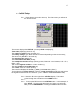
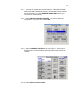
5.3.11. Using the Touchscreen keypad enter the desired roll number or
name. Touch the ENT button to enter the name.
5.3.12. Touch the STATUS (STOP) button at the upper right to go back to
the previous menu. (Or push the MENU button on the Front Panel).
You will not change the status by touching this button. It is safe to
select it at any time, even when recording. Touch it 2 more times to
get back to the MY DEVA menu. Now we will set up the internal
(optional) DVD Drive and/or any external fire wire devices.
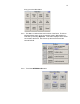
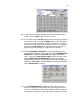
5.3.13. Select INTERNAL DVD DRIVE. (This only applies if have the
optional internal DVD Drive.) This takes you to the INTERNAL DVD
DRIVE MENU.
Select the FILE TYPE and toggle to select WAV
POLY. Next select FILE RESOLUTION and set it at 24 bits. Next
select SAMPLE RATE CONVERSION and select the desired
sample rate which in this case is 48000. Next we will FORMAT the
DVD disk. REMEMBER, THIS ERASES ALL DATA ON THE DISK.
Select ERASE DISK. Click OK
5.3.14. Select MIRROR MODE to enable Mirroring. (Mirroring is the
process of copying the internal hard drive). Mirroring occurs while
recording. Depending on the number of tracks being recorded and
the speed of the DVD drive, mirroring may continue after recording