
Owner`s manual

21
has finished. You may start a new take at any time. The mirroring
process will automatically catch up if needed.
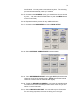
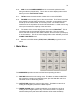
5.3.15. Go back to the MY DEVA menu (you should know how to do this
by now…. Ok, select the STATUS button or push the MENU button
on the Front Panel.)
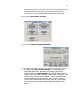
5.3.16. Repeat the above process for any additional drives
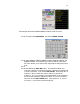
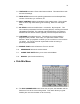
5.3.17. Go back to the MAIN MENU and select DEVA SETUP
5.3.18. Select INTERNAL SAMPLE RATE to select 48000.
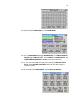
5.3.19. Go to REFERENCE SELECT and toggle AUTO (this selects the
reference clock for the sampling rate. AUTO chooses the internal
reference unless it sees an external AES signal)
5.3.20. Toggle the RECORD CHANNELS. In this set-up example where
we have 4 mics to be recorded pre-fader and a mono mix you can
select ‘5’ record channels.
5.3.21. Select PRE-RECORD TIME. You can select up to 15 seconds.
For our set-up purposes, since we are doing a ‘run and gun’