
Owner`s manual

23
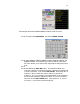
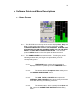
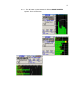
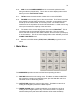
This example shows the HOME SCREEN in SOLO mode for track 4.
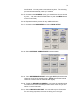
5.3.25. Go back to the MAIN MENU. And select FADER ASSIGN
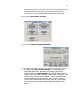
5.3.26. Select Input 1 for Pot 1, Input 2 for Pot 2, Input 3 for Pot 3, and
Input 4 for Pot 4. Since DEVA only has 4 input level control pots
this menu allows you to select which inputs will be assigned to which
pots.
5.3.27.
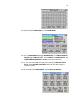
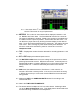
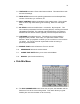
5.3.28. Next Select the DISK MIX button. This matrix will allow us to
route the 4 inputs in this example to tracks 1 through 4 pre-fader and
to track 5 post fader. First, Select PRE-FADER. Then select IN1 for
Channel 1, IN2 for Channel 2, IN3 for channel 3, and IN4 for
Channel 4. An ‘A’ (for analog input) should appear in each selected
box (Pre-fader selections appear as a white ‘A’ or ‘D’ in the matrix).
Next, turn off the PRE-FADER button. Next, select In1, 2, 3 and 4
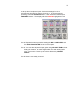
for Track 5. Your screen should look like this: