
Owner`s manual

24
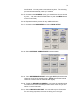
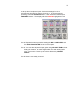
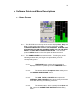
5.3.29. Next select TIME CODE from the MAIN MENU.
5.3.30. For TIMECODE OUT toggle GENERATOR, for TIMECODE RUN
MODE toggle TIME OF DAY. Select 30NDF for FRAME RATE. Set
TIMECODE REFERENCE to XTAL (more about this later).
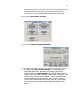
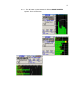
5.3.31. You can set the date as user bits by selecting TOGGLE USER
BITS. Select ENTER USER BITS and enter the date using the
numeric keypad.
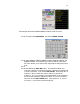
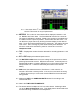
5.3.32. Go back to the MAIN MENU. Select INPUT CONTROL