
Owner`s manual

26
6. Software Guide and Menu Descriptions
6.1. Home Screen
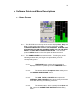
6.1.1. The STATUS bar on the top of the screen displays Run, Stop and
Play. Pushing this button takes you to the next menu. THIS
CONVENTION APPLIES TO ALL THE SCREENS. PUSHING THE
STATUS BUTTON ON ANY SCREEN TAKES YOU TO THE NEXT
MENU. IT DOES NOT CHANGE THE STATUS. You can also
push the MENU button on the front panel to advance menus.
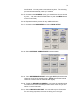
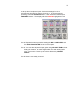
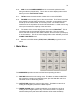
6.1.2. The HOME SCREEN is an active screen. Touching any of the
following buttons with your finger or a stylus takes you to its
corresponding menu.
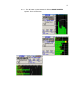
6.1.2.1. TIME CODE button (on the above example it
displays 00:00:01:19) takes you to the TIMECODE menu
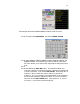
6.1.2.2. The button with the Headphone Icon takes you to
the NORMAL HEADPHONE menu.
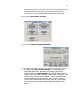
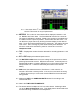
6.1.2.3. The CUR TOTAL FOLDER button opens the
INTERNAL DISK FOLDERS menu which gives you access
to the disk directory and labeling functions.
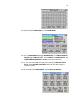
6.1.2.4. The bottom button, which currently shows S.6a and
T.2, opens the SCENE TAKE NOTES Meta Data Entry
menu.