
Owner`s manual

29
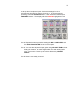
6.10. CUR shows the INDEX NUMBER of the current take (either the take
being recorded or played back). This is also an active display button which
takes you to the Internal Disk Folder.
6.11. TOTAL shows the total number of takes in the current FOLDER.
6.12. FOLDER is the number given to the current folder. The Folder is the hard
drive partition currently being recorded to. Normally, a new partition would
be set up for each Sound Roll, or each day’s work. The Folder Number
would then be the equivalent of the Sound Roll Number. A folder can be any
size up to the maximum capacity of the hard drive.
6.13. The bottom of the screen displays the User entered ‘Meta Data’. This is
information that can be entered regarding each take. This can include
Scene and Take numbers, Wild Track numbers, and brief notes (currently up
to 16 Characters). This is an active display button which will take you to the
SCENE TAKE NOTE menu.
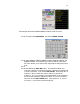
6.14. Select the STATUS button (STOP, PLAY, RECORD) to go to the next
menu.
7. Main Menu
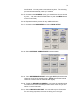
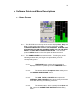
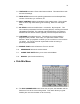
The MAIN MENU provides access to all the Deva operating functions.
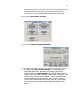
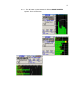
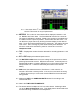
7.1. DISK MIX selects the main routing menu. This Menu includes the MATRIX
that routes the 8 Analog and 8 Digital Inputs, plus the Slate Mic and Tone
Generator to the 10 Recording Tracks.
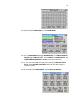
7.2. OUTPUT MIX selects the output routing menu. This Matrix routes the 8
Analog and 8 Digital Inputs to the 8 Main Outputs.
7.3. FADER ASSIGN opens a matrix that allows you to assign any of the 8
Analog and/or 8 Digital inputs to any or all of the 4 faders. An optional
external fader panel (and associated software will be made available)