
Owner`s manual

30
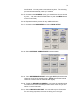
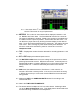
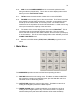
7.4. TIME CODE selects the Time Code feature window. This sets all time code
and user bit settings.
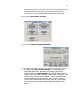
7.5. DEVA SETUP sets the main operating parameters such as Sample Rate,
number of channels, sync reference, etc.
7.6. INPUT CONTROL sets the parameters of the Analog inputs. This includes
Mic/Line level, High Pass Filtering, Mic Powering, Gain Trim and Digital
Delay.
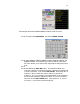
7.7. MY DEVA is similar to the Windows
tm convention, ‘My Computer’. This
menu sets the parameters for all the recording devices, including the Internal
(Swappable) Hard Disk, The (optional) Internal DVD Drive, the (optional)
external Fire Wire device and the (optional) Internal Compact Flash Card.
7.8. CUE MODE is the playback menu. This allows you to select takes by
Segment (Index) number, Time Code, or to just Fast Forward or Fast
Reverse. When you playback on DEVA you do not have to re-cue to where
you where. You can hit record at anytime without fear of erasing a
previously recorded take.
7.9. ENABLE TONE turns the Reference Tone On and Off.
7.10. HEADPHONE selects the monitor matrix.
7.11. SCENE TAKE NOTE allows you to enter and edit Meta.
7.12. MANUAL (No function at this time)
8. Disk Mix Menu
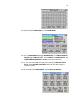
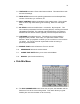
8.1. The DISK CHANNEL MIX matrix routes the 16 inputs, the Slate Mic and the
Reference Tone to the 10 recording tracks. This matrix allows you great
flexibility but care must be taken to set it correctly.