
Owner`s manual



Deva IV and Deva V Owner’s Manual
Chapter 1
5
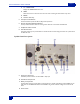
q F6 —HEADPHONE
Displays the HEADPHONE matrix menu.
q MENU
Advances the screen to the next menu. This is the same as touching the status button in any menu.
q ENTER
q Confirms data entry.
5. Transport Control Buttons
These three buttons provide the Record, Play, and Stop functions.
6. Numeric Keypad and Backspace Buttons
These provide an alternative means of entering numeric data such as Time Code and Meta-Data.
7. Headphone Volume Control
8. Slate Mic Activation
This button requires you to push and hold it to activate the slate mic. All routing for the slate mic is performed in
the Disk Mix menu.
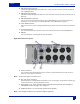
Left Side Panel Descriptions
9. Power Input Connector
Standard 4-pin XLR connector for 9.5V-18VDC 1 Amp input
10. Hard Drive Compartment
11. Battery Compartment
The black knob rotates to lock the battery compartment door. Use NP1 type batteries with the DEVA. You can
safely use Li-ion and NiMH NP1 batteries in the DEVA as long as their maximum voltage does not exceed 18
VDC.
12. Power Switch