
Owner`s manual


6
Deva IV and Deva V Owner’s Manual
Chapter 1
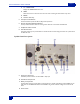
13. AES Digital Output Connector
Connect the supplied AES Digital output cable to this is a 15-pin mini Sub-D connector. The cable provides four
pairs of AES digital output.
14. AES Digital Input Connector
Connect the supplied AES Digital input cable to this 15 pin mini sub-D connector. The cable provides four pairs of
AES inputs.
15. IEEE 1394 (FireWire) connector
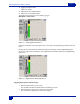
This port can be used with FireWire hard drives, CD, and DVD-RAM drives. If the external FireWire device
requires power, it can be turned on from the My DEVA menu. (see My DEVA Menu on page 45).
16. Serial / RS422 connector
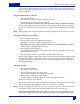
This 9-pin connector is used for controlling the DEVA using an external device such as the Zaxcom Deva MIX-12
mixer.
17. Time Code Connector
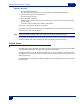
This is the standard 5 pin Lemo connector used for Time Code I/O (Lemo part number: EGG.OB.305.CLL)
18. USB Port
This port is designed for connecting Zaxcom approved keyboards.
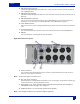
Right Side Panel Description
19 20
21 22
19. Camera Connector
This is a standard 10-pin Hirose ENG type camera connector. It outputs Channels 5 and 6 to the camera and
returns the monitor feed from the camera.
Note: The two monitor feeds are summed to mono.
20. Mic / Line Inputs 1 through 8
Each balanced input is internally padded to handle either mic or line level signals. The signal level is selected using
the Input Control screen. (Line Input Impedance is 4 KΩ).
21. Analog Outputs 1- 6 - 25 pin connector outputs 6 channels of line level audio. Menu selectable to
output either channels 1 through 6 or 5 through 10.
22. Headphone Output - 1/4-in. Stereo Jack, optimal 100 Ω impedance.
Note: Lower headphone impedances result in louder headphone output levels.