
Owner`s manual


Deva IV and Deva V Owner’s Manual
Chapter 2
7
Chapter 2
Setting Up the Connections
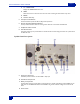
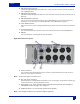
This section describes how to connect external microphones, line devices and the proper settings on the
DEVA required to make these connections work.
DEVA V has factory default presets so you can power up the machine and start recording. When you
pow
er on the DEVA, it takes 3-5 seconds to start-up. The default setting has the home screen appear once
the DEVA has finished its startup sequence, however you can change this using the User Interface Settings.
Power
An external A/C power supply comes with the unit, if you are going to use the DEVA in a situation where
there is no power, an internal or external battery can be used. The internal battery is a standard NP-1 style
battery. The DEVA V can use any NP-1 style battery that supplies the proper voltage of
9.5-18 VDC.
Note: The DEVA
does not charge the NP-1 battery when a battery is installed and external power is used.
Current Draw
The DEVA draws approximately 900 mA while recording. This current increases if powering an external
FireWire drive or when mirroring to the optional internal DVD-RAM drive.
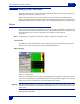
Battery Display
Figure 2-1 Home Screen
The home screen displays the source of power and voltage. When
the voltage of any internal or external
power source drops below the customdefined threshold , the battery indicator changes to red. When the
voltage of the power source drops below 9.5 volts the DEVA powers itself off.
Warning: When the DEVA shuts itself off due to power loss or insufficient power. The audio tracks are left in the “open” state.
When the unit is turned back on, it automatically scans these files and close them. However, this process can take
several minutes.
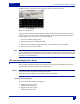
Setting the Battery Threshold