
Owner`s manual


8
Deva IV and Deva V Owner’s Manual
Chapter 2
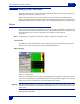
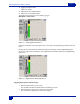
The Battery Menu is accessed by pressing the battery indicator on the Home screen.
Figure 2-2 Battery Menu
The graph shown in the Battery Menu displays the voltage and how
long the battery has been used. The
curve is unique for each type of battery used (liON, NiMH). To change the threshold when the battery
indicator changes to red on the Home screen, do the following:
1. Press the Low Battery Voltage button.
2. Using the keypad, enter the threshold voltage
3. Either Press the Low Battery Voltage button agai
n,
or Press the Enter key on the keypad.
4. Press Stop to return to Home screen.
Hint: If you need to run on battery power for an extended period of time, and need to record during this time,
connect an external battery to DEVA when the internal battery is low. When an external power source is
used, the DEVA automatically switches to this power source. This enables you to continue recording while
you switch out the internal battery.
Microphone/Analog Line Input
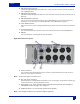
There are eight microphone/analog line input connections on the right side of the DEVA. These can be
used with either microphones or with a line level analog input.
Caution: Prior to connecting any analog input to the DEVA, you should ensure the Microphone/Analog Line Input
Connectors are setup correctly in the Analog Input Control.
When Connecting microphones, you should always power off the DEVA.
Selecting the Analog Input
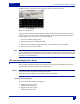
The input control menu contains the settings for
o toggling the connectors input
options: line and microphone.
o toggling the connectors power
options: 48 VDC and None