
Owner`s manual



Deva IV and Deva V Owner’s Manual
Chapter 2
9
o Toggling the High Pass Filter
options: On and off
o Adjust Delay of any available channel
o Adjust trim of any available channel.
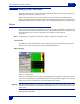
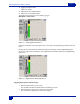
The Analog Input Control menu can be found by going to:
Main Menu > Input Control
Figure 2-1 Analog Input Control Screen
Pressing the Stop button in the upper right corner or menu
key on the keypad brings you back to the main
menu.
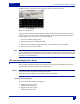
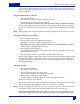
Pressing any of the channel buttons without pressing any m
ode change, opens the Digital/Analog Input
Screen for a single channel. All functions can be adjusted for that specific channel from the Digital/Analog
Input screen.
Figure 2-2 Single Channel Analog Input Screen
Toggling Microphone and Line Input
1. Press the Mic/Line button on the screen.
The red LED on the Mic/Line button flashes red indicating it is active.
2. Press the button on the screen for channel you want change.
The channel button displays the curr
ent mic/line setting