
Owner`s manual



14
Deva IV and Deva V Owner’s Manual
Chapter 3
need to perform some recording test to ensure the hard drive in the Deva can write at this high sampling
rate.
To improve the mirroring speed, you should switch the sampling rate back to 48 kHz.
Comming Soon
o The Custom Sample Rate will be available at a later date.
Selecting the Number of channels to Record
Main Menu > DEVA Setup > Record Channels > Record Track Select
Before you can record, you have to set the number of tracks you want to record. If you use a different
number of channels often, this step is critical since it’s possible to record blank tracks, or worse not enough
(although you are given a visual clue on the home screen when this happens).
Note: Channels
which have been selected to mix to internal hard drive are shown in the Record Track Select window in
blue.
1. Press the DEVA Setup button on the Main Menu screen.
The DEVA Setup Screen appears.
2. Press the Record Channels button
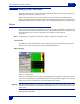
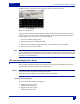
The Record Track Select screen appears.
q Four presets are available; two track, four track, tracks m
ixed to, and all tracks. Two, Four and All
tracks are self-explanatory. Tracks mixed to sets the DEVA to only record those tracks which are
being mixed to the internal hard drive. Using Tracks mixed to allows you to always have the
proper number of record channels available.
Hint: Pressing the backspace button on the DEVA keypad while pressing the appropriate meter on the Home
Screen toggles the recording of that channel.
3. Either press one of the preset buttons, or press the button under the channels.
An X in the button indicated that is a channel which will be recorded.
Selecting the Prerecord Time
Main Menu > DEVA Setup > Pre-Record Time
The DEVA V and VI when powered on, are always processing data. Any sound coming in from any input is
always being processed. One of the benefits to doing this, is with a sampling rate of 48 kHz and below a
portion of the audio is buffered and it allows you to press Record, and have that buffered portion of the
audio placed at the beginning of the segment. You have an option of having from 1 to 10 seconds of audio
buffered.
1. Press the DEVA Setup button on the Main Menu screen.
The DEVA Setup Screen appears.
2. Press the Pre-Record Time.
Each time you press the button, the time is increased one second
from none (off) to the maximum of
10 seconds. The amount of prerecord time is shown in blue just above the Pre-Record Time button.