
Owner`s manual




Deva IV and Deva V Owner’s Manual
Chapter 3
15
Important: The Prerecord buffer is discarded after any of the following settings are changed:
oSample Rate Reference
oInternal Sample Rate
oTimecode
oUserbits
oFrame Rate
oTimecode Run Mode
The Mix
This section discusses setup the mix. You can have different mixes between the internal hard drive and any
audio you pass through the analog or digital output ports.
Setting the Internal Mix
Main Menu > Disk Mix
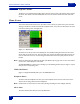
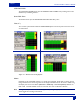
The Disk Channel Mix screen is setup in a grid fashion. This allows you to quickly set the proper input and
output channels.
Setting the channel
There are two options when recording to the internal har
d drive, you can either record the audio prior to
faders, or post faders. When you use pre-faders, the audio that comes in to the analog channel is what gets
recorded regardless of any fader adjustments you make.
Options to set Prior to Recording
Selecting the Tone Level
Main Menu > DEVA Setup > Tone Level
Usually it is customary to put a tone at the beginning of a segment, which is later used by the post-produc-
tion facility to ensure all the levels are correct. It is also a good way to verify any equipment which is receiv-
ing an audio feed from the DEVA has the correct metering on
their equipment. You can select a tone level
of -12 dB, -14 dB, -16 dB, -18 dB, and -20 dB.
1. Press the DEVA Setup button on the Main Menu screen.
The DEVA Setup Screen appears.
2. Press the Tone Level button.
Each time you press the button, the tone is increased 2 dB, from it’s previous setting. The tone level is
shown
in blue just above the Tone Level button.
Setting the number of meters on the Home Screen
Main Menu > DEVA Setup > Meters > Number of Home Screen Meters
You can have from 4 to 10 meters on your home screen (8 meters for the DEVA IV). Any meter shown on
the home screen that is not being mixed to the internal hard drive is shown on the home screen with a line
through it.