
Owner`s manual



16
Deva IV and Deva V Owner’s Manual
Chapter 3
Important: Make sure to have at least the same number of channels displayed on the home screen as you are mixing. It
is possible if you are not careful to record and mix channels which will have no meter shown on the home
screen.
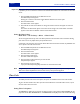
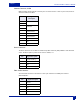
1. Press the DEVA Setup button on the Main Menu screen.
The DEVA Setup Screen appears.
Pressing the ‘v’ button on the screen toggles
between different home screen styles.
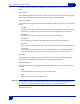
2. Press the Meters button
The Meters Menu screen appears.
3. Press Number of Home Screen Meters to change t
he number of meters that appear on the home
screen.
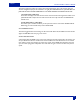
The number of channels that appear on the home scr
een changes. The actual number of channels
appears in blue above the Number of Home Screen Meters button.
Setting the Meter Labels
Main Menu > DEVA Setup > Meters > Meter Labels
You can change the label of any meter. This label is placed into the meta-data of the sound files. Labeling
your meters can be very helpful to the post production house.
A maximum of 16 characters can be used for labels. When this lim
it has been reached, any additional char-
acter is placed in the 16th character slot.
1. Press the DEVA Setup button on the Main Menu screen.
The DEVA Setup Screen appears.
2. Press the Meters button
The Meters Menu screen appears.
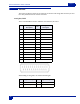
3. Press the Meter Labels button.
The Meter Labels Menu appears.
4. Press the Meter number button that you want to label.
A keyboard layout appears.
5. Press the letters to enter the label.
If you press the backspace key (Bsp) characters are removed from the label.
Hint: Using a PDA stylus with the keyboard or using an external keyboard may increase your accuracy. The Deva
MIX-12 has a built-in keyboard that also increases accuracy and speed entering labels.
Time Code
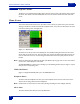
The DEVA provides several time code options, all options are available from the Time Code window.
To get to the Time Code screen, either press the Time Code button on the Main Menu screen, or press
th
e time code in the home screen.
Setting Time Code Options
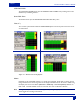
The READER T.C. displays Time code from any External source coming into the DEVA. READER U.B. dis-
plays external User Bits. GENERATOR T.C. and GENERAT
OR U.B. displays Time Code and User Bits being