User guide
Manuals
Brands
Zebra Manuals
Computer equipment
TLP 2824
11
12
13
14
15
16
17
18
19
20
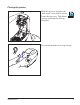
Closing the printer
Hold the top cover and press the
“kick-stand” cover lock to release.
Lower the top cover. The ribbon
carriage automatically folds up
into place.
Press down until the cover snaps closed.
980485-001A
5
MOVIE
1
...
...
11
12
13
14
15
...
...
60