
User Manual


22
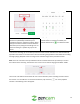
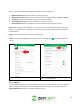
Below is a description of the features listed in this menu:
Allows the user to access cloud recordings in list format.
Allows the user to access microSD recordings in list format.
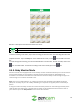
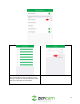
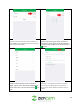
To view a recording in this menu, tap on the recording you want to access. The recording will load in the
playback interface. Tap on the Play icon in the middle of the screen, or the icon located in the time
bar.
To scroll through the recording, use the included slide bar in the time bar. To listen to audio, click on the
icon to enable audio. To view the recording in full screen mode, tap on the icon.
4.4.4. Baby Monitor Mode
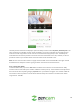
Zencam cameras come equipped with a built-in baby monitor mode which allows you to use the camera
to keep track of babies or small children. The baby monitor mode provides an adjustable sound
threshold in the interface that allows the audio from the camera to always come through the app or to
come through once a certain threshold is met.
Note: This is not a medical device, nor a device to prevent cases of Sudden Infant Death Syndrome
(SIDS). Do not solely rely on it for a baby's wellbeing. It is important to regularly check on the baby in
person.
If using the camera as a baby monitor the camera should be placed in an area with high visibility of the
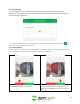
child and free from obstruction. The baby monitor mode can be activated via the live view screen of
your camera. Tap on the Baby Monitor icon to access the interface.