
User Manual


23
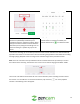
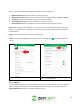
The baby monitor interface will display 3 options for baby monitor mode: Off, Auto, and Always On. The
"Off" mode will turn off baby monitor mode completely. The "Auto" mode will turn the baby monitor
mode on but will only produce sound once the set sound threshold (squelch) is met. The Always On
mode will have the camera produce sound even if the sound threshold is not met, however, it will not
provide an alarm to your mobile device unless the alarm sound threshold is met.
Note: For the most accurate results it is highly recommended not to exceed 60 dBs. The higher the dB
threshold the less likely the camera is going to detect sound from the monitored area.
4.4.4.1. Using Auto Mode
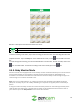
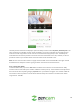
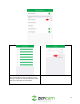
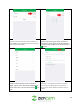
To activate Auto mode, tap on the Auto button located in the interface. A sound threshold in baby
monitor mode is measured by the number of dBs the camera picks up. The threshold can be adjusted in
the Auto mode menu by sliding the gray "Squelch" line up and down the graph. The number of dBs the
line needs to reach to produce a sound will be determined by the numbers in the left column which
range from 0 - 100 dBs.