
User Manual


25
4.4.5. Using Pan/Tilt
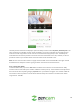
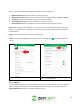
The pan/tilt function allows you to control the movement of your camera right from the Zencam
Security app. To use your camera’s PT function, tap on the Pan/Tilt option located on the live view
screen to display the PT controller. Use your finger to move the camera up, down, left, and right.
4.5. Device Settings
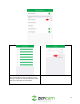
The Device Information menu allows the user to adjust set and adjust device settings associated with
the camera. The device information menu is represented by a small gear wheel icon ( ) located in the
upper right-hand corner of the screen.
4.5.1. Device Information
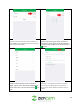
This field allows the user to adjust camera information:
Device Thumbnail
The device thumbnail is the initial image you will see
Device Name
This menu allows the user to modify the name of the camera.
Device Password
This menu allows the user to update the password of the camera.
Model Number
This field shows the model number of the camera that is being viewed.
Serial Number
This field allows the user to view the serial number of their camera.
Mac Address
This field shows the Mac address associated with your camera.
IP Address
This field shows the current IP address associated with your camera.
Firmware
This menu allows the user to view if their camera is running on the most up
to date firmware. This menu also allows users to download the latest version
of firmware if necessary.
4.5.2. Motion Detection
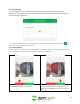
Setting motion detection for your camera will allow you to choose how your camera will react to motion
events as well as how they will be recorded. There are a lot of customization options available that can
be directly configured using the app.