
User Manual


26
Here is a list of all the advanced configuration options for motion detection:
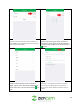
• Motion Schedule: Modify motion detection recording timings.
• Motion Sensitivity: Select the current sensitivity for motion. Ranges between 1(MIN) and 6(MAX).
• Set Regions: Specify motion detection regions to reduce false alarms.
• Email Notifications: Enables motion notifications to be sent via email.
• Email Snapshots: Enables a snapshot of a motion detection event to be sent via email.
Note: When setting up motion detection, motion events will be recorded and accessed on either the
cloud or on a microSD card. To setup motion detection on your camera, please follow the instructions
provided below.
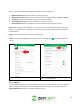
Step 1: Log into your camera on the Zencam Security app.
Step 2: Once you have logged into your account, select the settings icon ( ) in the upper right-hand
corner.
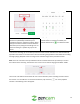
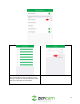
3. In the settings menu, tap on Motion Detection.
4. Enable the motion detection toggle switch to
turn on motion detection.
4.5.2.1. Schedule
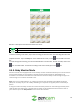
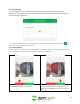
This menu allows the user to set motion detection schedules. A motion schedule will set the camera to
begin recording motion detection events at designated times set by the user. To begin, tap on the
Motion Schedule field located in the Motion Detection menu: