
User Manual


28
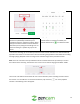
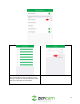
Tap on “Start Time” and use the scroll option to
select a time you want the motion schedule to
start. Note: In this example we will be setting the
start time to 6am (0600).
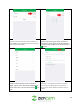
Tap on “End Time” and use the scroll option to
select a time you want the motion schedule to
stop. Note: In this example we will be setting the
stop time to 5pm (1700). Tap on the back arrow (
) to exit.
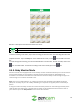
Tap on “Repeat” to choose which days of the
week you would like the motion schedule to
apply. A green check mark will be displayed next
to the active days. Tap on the back arrow ( ) to
exit.
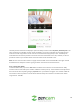
Tap on the “Save” button to save your motion
schedule. To add additional motion schedules,
you can tap on Add Schedule and repeat the
setup process. Note: Motion schedules cannot
overlap.