
User Manual


29
4.5.2.2. Sensitivity
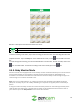
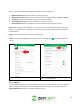
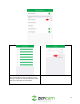
This menu allows the user to adjust motion detection sensitivity associated with their camera.
Motion sensitivity ranges from 1 to 5, 1 being the lowest and 5 being the max. By default, the camera
will be set to 3 for optimal use.
To change the motion sensitivity, select between 1 and 5 sensitivity ranges. Tap the save icon ( ) to
save the sensitivity setting for your camera.
4.5.3.3. Set Regions
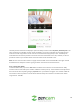
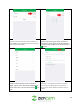
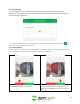
Setting regions in the Zencam Security app, allows the user to set activity zones that help to block out
any unnecessary areas you do not want to be used for motion detection.
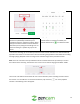
To set the regions on your live view window, tap
on Clear Zone to begin setting regions.
Use your finger to drag and set the desired region
in the grid. When you have finished setting your
region, tap on Save Zone to save the set region to
your app.