
User Manual



36
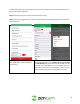
5. Once the email provider is selected,
the app will then automatically import
the correct SMTP Server, port
number and Authentication for your
specific email provider. You will then
input your email address in the
"Username" field, your email address
password in the "Password" field, and
in the "Sender" field you will put your
email address in as well.
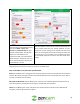
6. Once this information is input into your app, we can then
input the recipients. There can be a total of 6 total recipients
max to receive alerts for your camera however, for this
example we are just setting up one. Please enter the email
address of the recipient who will be receiving the alerts and
then press the "+" icon to add it to your recipients list. Once
this is complete please press "Save" to save your email alerts
settings.
Congratulations! Your Zencam camera is now set up for Email Alerts.
Other email SMTP server Information provided below:
Gmail has the SMTP server "smtp.gmail.com" (without quotes) and will use port 465 with SSL encryption
and port 587 with TLS encryption. Please note that with Gmail you will need to allow less secure apps to
connect in the Gmail account options.
Microsoft Live & Hotmail have the SMTP server "smtp.live.com" (without quotes) and will use port 25
with TLS encryption, port 465 with SSL encryption, and 587 with TLS encryption.
Yahoo has the SMTP server "smtp.mail.yahoo.com" (without quotes) and will use port 465 with SSL
encryption, and port 587 with TLS encryption.