
User Manual



37
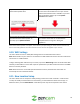
Comcast has the SMTP server "smtp.comcast.net" (without quotes) and will use port 465 with SSL
encryption, and port 587 with TLS encryption.
Note: If your email service provider is not included in this list, you can simply Google the following and
find the information you need: "*email provider* + SMTP + setup".
If your email information is not listed above, please use this link for a list of more common SMTP email
settings. https://www.arclab.com/en/kb/email/list-of-smtp-andpop3-servers-mailserver-list.html
For further assistance you may submit a ticket via the button below the comments on this page or you
may contact us at: 888-212-7538.
4.14. Delete Device
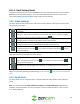
This option allows users to remove devices from their Zencam account. To delete your camera off your
account, tap on the Delete Device button. When a device is deleted you will have the option to keep
your cloud recordings or delete them.
Note: Once cloud recordings have been deleted, they cannot be retained again by the system. They will
be permanently deleted.
4.15. Devices Menu
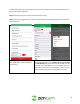
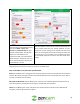
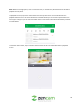
The Devices menu allows the user to select specific devices connected to their account. The Devices
menu can be accessed by tapping the back ( ) icon in the app interface, or when you first log into the
app.
Below is a screen shot of the device’s menu: