
User Manual

43
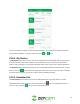
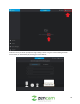
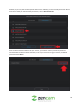
allows you to share the event. To share an event, tap on the icon located beneath the playback
screen. Lastly, you can rename the video by tapping the icon, rename the file, and press OK.
If you would like to delete the recording, tap on the ( ) icon located in the upper right-hand corner.
To exit this screen, tap on the ( ) icon to return to the previous menu.
4.15.6.2. Snapshots
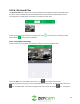
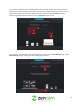
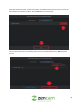
To view snapshots, tap on the ( ) icon to access the snapshots menu.
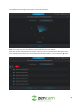
To view a snapshot, select an image from this screen. If you would like to modify a snapshot, tap on the (
) icon located in the upper right-hand menu. You can select an image individually or you can tap on
the icon to select all images. At the bottom of the screen you will notice two icons. Tap on the (
) icon to share the image(s) or tap on the ( ) icon to delete the image(s). To apply the
modifications to the image(s) tap on the ( ) icon. To exit this screen, tap on the ( ) icon to return to
the previous menu.
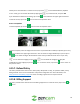
4.15.7. Refund Policy
This menu provides users access to our refund policy. We provide a 7-day, no questions asked, money
back guarantee. There are no refunds after 7 days of the charge date. For more information, visit
https://amcrest.com/billing-support to access our billing support form to request a refund.
4.15.8. Billing Support
This menu provides users direct access to the billing support form. To exit this menu, tap on the ( ) or
( ) icons.