
User Manual


51
5.1.3. Basic Operation
This section will highlight the various features and functionalities of the Zencam Desktop software once
the camera has been added to the software.
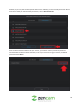
To begin, hover your mouse pointer over the desired camera. You will notice a icon and a recording
Icon. Select the icon to access the live feed for your device.
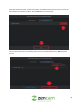
Once the icon has been selected you will notice your live feed will begin to play. In this menu on the
bottom, center banner, you will notice a list of controls.