
User Manual


53
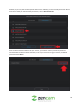
In the settings menu you will notice a list of options to choose from. Below is a description of each of
these settings:
Modify: Click the modify button to modify the nickname for your camera. Please note, the nickname for
your device cannot exceed 20 characters.
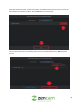
Storage Path: Click this button to set your device’s snapshot and recordings to a different path on your
computer. The browser button will allow you to search for a specified folder and the open folder button
will allow you to view the folder you have selected.
Desktop Notifications: Click this button to enable notifications of motion detected events to be routed
to your computer’s desktop. There are a few alarm sounds you can choose from; Siren, Greeting, Signal,
and Mute.
Launch on Startup: Enable this option to launch your Zencam software automatically upon a reboot of
your computer.
5.1.4. Desktop Support Software Overview
Devices
The Devices menu allows the user to access their live freed and recordings. Each device connected to
the software will be displayed and all settings associated with that device can be accessed.