
Quick Start Guide

Refrigerator
SHABBOS KEEPER
100% Shabbos Certied Through 2050
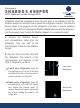
3. The Shabbos Keeper will perform
a software update and display
“UPDATING SOFTWARE” on the
display. This will take approximately 15
minutes. Your refrigerator may restart
during this time. The display and lights
may go dark for over 5 minutes. Do not
disconnect power to the refrigerator
during this time.
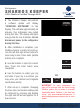
4. After installation is complete, your
Shabbos Keeper is ready to be set-up.
Use the left and right arrow buttons to
input today’s date. Press enter (middle
button) once complete.
5. Use the buttons to input the current
time. Press the enter button once
completed.
6. Use the buttons to select your city
and state. If your city is not listed, you
may enter your latitude and longitude
coordinates directly.
7. After set-up is complete, changing
the time, date, and location settings can
be achieved by pressing and holding
the right and left arrows together for a
few seconds.
IMPORTANT: On some refrigerators, ice
may not be removed from the bucket during
Shabbos unless the ice maker is manually
deactivated before Shabbos. If you have any
issues, visit www.zmantechnologies.com or
email sales@zmantechnologies.com for more
details.
UPDATING
SOFTWARE
***
NY
MANHATTAN
CITY
NOT LISTED
LATITUDE
00.00
LONGITUDE
00.00
OR