
User manual







Copyright © 2007 by Futures, Inc. All rights reserved
19
After completing the “WiFi Chipset Selection” screen, there are one of two
paths the user will follow towards completing the WhirlWind Platinum setup
process:
Selection of a single chipset to be used:
See section “WiFi Device Selection (Platinum Version)”
Selection of MultiChipsets (experimental):
See section “WiFi MultiChipset Selection (Platinum Version)”
This section is introduced first due to the “WiFi Device Selection” being
part of both paths.
WiFi MultiChipset Selection (Platinum Version):
CAUTION: This is an experimental area of WhirlWind. It has been added to
allow users to try various cards/chipsets at the same time. It has been
observed that the system may lock-up during configuration of the cards, though
rarely, depending on the system used and the chipsets within the wireless
cards. If WhirlWind locks-up, please reboot the system, contact Futures with
the chipset combination being attempted, and stop use of the chipset
combination at this time.
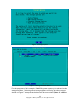
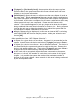
This section discusses the screen presented to the user after selection of
“MultiChipsets” has been made. See Figure 12. This screen shows a list of
wireless chipsets on the left side and the number of respective cards attached
to the system on the right side. Each chipset may be enabled/disabled by the
user. All chipsets are enabled by default. Chipsets may be selected by the
user pressing the <up arrow> and <down arrow> keys to highlight the chipset
and enabling/disabling by pressing the <space bar>.