
User manual







Copyright © 2007 by Futures, Inc. All rights reserved
20
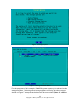
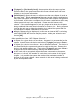
The following options are presented to the user:
Toggling the use of WiFi chipsets on/off. * (Asterick) means the chipset is
enabled for use
[OK]: Utilize the selected chipsets for use by the system.
[BACK]: Return to the previous screen.
[Re-Identify Cards]: Have the system re-identify all the cards in the system
and refresh the current display with the updated information. This option
should be used if a new card has been placed in the system that needs to be
identified.
Figure - 12 WiFi MultiChipset Selection (Platinum Version)
Once the user selects [OK], the system will display:
“WiFi Device Selection” screen.
WiFi Device Selection (Platinum Version)
This section discusses the screen presented to the user after selection of single
Chipset or MultiChipset configuration. See Figure 13. This screen shows a list
of wireless cards on the left side with their respective chipsets on the right.
Each card may be enabled/disabled by the user. All cards are enabled by
default. Cards may be selected by the user pressing the up and down arrow
keys to highlight the card and enabled/disabled by pressing the space bar.