
User manual






Copyright © 2007 by Futures, Inc. All rights reserved
22
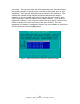
arrow keys. The user may enter any information they want into this window,
but anything outside of bounds will be removed by the system prior to final
assignment. Each channel assignment line is limited to 33 characters. This
includes the channels being assigned and spaces between the assigned
channels. A user may assign each card to a single channel in order to have
cards locked onto a specific channel once kismet is started. If all cards are
assigned all channels, a user may lock a given card on a specific channel once
kismet is started and a network exists on the given channel. Once the
assignment of channels is completed, the user can press <Enter> to continue or
use the tab key to select the [OK] button.
Figure - 14 WiFi Card Channel Assignments (Platinum Version)