
User manual






Copyright © 2007 by Futures, Inc. All rights reserved
23
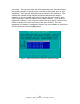
Following this screen, the user will be provided the “WiFi Card Channels
Assigned” screen.
WiFi Card Channels Assigned (Platinum Version)
This will allow the user to see what the exact card-to-channel configuration of
the system is going to be. If the user has any changes that need to be made,
please select [Re-assign Channels] button in order to go back to the “WiFi
Card Channel Assignments” screen. The screen should look similar to the
following:
Figure - 15 WiFi Card Channels Assigned (Platinum Version)
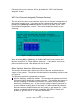
After selecting [OK] or [Return], all enabled WiFi devices are placed into
Monitor mode prior to “Other Options Selection”. If any device can not be
placed in Monitor mode, then Kismet will fail to start.
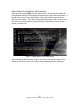
Other Options Selection (Platinum Version)
This section discusses other options provided to the user to enhance their
control of the system. The window viewed should be something similar to that
in Figure 16.
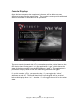
The following options are presented to the user:
GPS for mapping: enabled by default. This instructs the system to utilize a
GPS device while identifying wireless networks. This enables the system to
perform mapping of networks to proximity of location while performing
wardriving, warboating, etc. If you are only trying to identify networks in
an area without locating them on the map, it is OK to disable this feature.
With this feature disabled Kismet will not create a .gps output file. If this
feature is enabled without using a compatible GPS device, Kismet will
produce a .gps file full of “0” (zeroes) information.