
User manual




Copyright © 2007 by Futures, Inc. All rights reserved
34
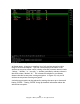
Figure - 23 Illustration of WiFi Sources Detected
As Kismet starts, it begins to compile a list of all wireless networks within
range of its wireless adapter. The first column displays the name of the
wireless access point whose traffic is being collected (common names include
“linksys,” “default,” or “<no ssid>”). Another particularly relevant column is
the third column, labeled “W.” This column tells whether or not Kismet
detects that the access point is using encryption. In Figure 23, only 4 of 8
wireless access points are using encryption.
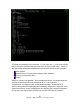
A wireless access point can be selected by moving the cursor up or down and
hitting “ENTER.” Hitting “ENTER” brings up detailed information about the
selected access point: