
User manual




Copyright © 2007 by Futures, Inc. All rights reserved
38
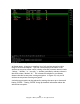
Figure - 27 Sniffer Data
In addition to cataloguing wireless network information, Kismet can also be
used as a sniffer to intercept wireless network traffic. First select the wireless
network of interest from the Kismet main screen, then press the “L” key to
lock on the channel (note: this command is case sensitive, it must be an upper
case “L” to lock the channel). The version of Kismet included in WhirlWind has
been modified to not only lock onto a channel (the default behavior of Kismet),
but to lock onto a single network operating on that channel. A lowercase “l”
locks the channel and the BSSID. This behavior avoids collecting traffic from
other access points that happen to be configured to use the same channel – a
useful feature in a noisy environment. When operating a system with multiple
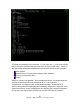
WiFi cards, please note that a pop-up window similar to the follow will appear
when requesting a channel lock or BSSID lock from Kismet. Kismet is
requesting the user to select a card to utilize for performing the channel/BSSID