
AP+4 Wireless Router/Access Point User Guide


Wireless Security
We strongly recommend that you set up security to protect your
network communication. The encryption method of choice is
WPA2-AES (WiFi® Protected Access 2 – Advanced Encryption
Standard).
Note: If all the wireless devices on your network use WPA2 or
WPA security, you can automatically configure WPA2 or WPA on
each device using the Wi-Fi Protected Setup (WPS) page on the
AP+4 Advanced Setup menu. See page
34.
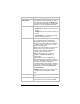
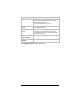
Parameter Select or enter . . .
Encryption
Select:
WPA2-AES if all the devices in your network
support WPA2.
WPA Mixed if some of your network devices
support WPA2 and some support WPA.
WPA-TKIP if all the devices in your network
support WPA.
WEP only if the devices in your network do not
support WPA2 or WPA.
None (not recommended)
24 Zoom AP+4 User Guide