
AP+4 Wireless Router/Access Point User Guide





32 Zoom AP+4 User Guide
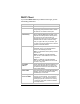
• Auto to allow either Open or Shared Key
clients with the correct SSID and WEP key
to connect and communicate.
Fragment
Threshold
Fragment (Data fragmentation) Threshold: If
the AP+4 often transmits large files, you can
set a limit on packet size. If the limit is
exceeded, the AP+4 will split the packet. The
default is Disabled (2346).
RTS Threshold RTS (Request To Send) Threshold: This is a
mechanism designed to ensure that all devices
in a network can send data to the AP+4. If
some laptops are having trouble
communicating, enter the maximum packet
size of data to be sent – 0 to 1500 is
recommended. If the packet size exceeds the
value you set, RTS will be activated. The
default is Disabled (2347).
Beacon Interval
Length of time between broadcasts of the
beacon frame by the AP. The beacon frame
contains control information and can be used
by mobile stations to locate an AP. The default
is 100 milliseconds.
Data Rate
Select the AP+4’s data transmission rate.
Preamble Type
Select the length of the message header.
Broadcast SSID Select Enabled to allow the AP+4 to broadcast
its SSID.
Select Disabled if you want to require clients
to know the AP+4’s SSID in order to join the
network.
IAPP IAPP (Inter-Access Point Protocol) is an
extension to the IEEE 802.11 standard that
permits wireless communications among
multivendor access points. Select Enabled or
Disabled.
802.11g
Protection
If you selected the 2.4 GHz B+G band on the
Wireless Basic Settings page, select this
option to allow 802.11b clients to work with the
AP+4.
RF Output Power Select a Radio Frequency output of 5% to
100%.