
AP+4 Wireless Router/Access Point User Guide

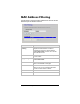


MAC Address Filtering
Use this page to specify the MAC addresses of devices who are
allowed to join the wireless network.
Parameter Select or enter . . .
Enable MAC
Filtering
When you select this check box, the AP+4 will
compare the MAC address of a device
requesting access to the network with the
Current Filter Table. Devices not on the list
will be denied access.
MAC Address
Enter the MAC addresses – without separators
– one at a time.
Apply Changes
Click this button to add the MAC address to the
Current Filter Table.
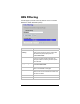
Reset
If you make a mistake, click this button to
return to the defaults on this page.
Delete Selected In the Current Filter Table, click the Select
check box for one or more MAC addresses
and then click this button to delete.
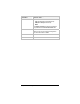
Delete All
Click this button to clear the table.
Reset Click to clear the Select check boxes.
Chapter 7. VPN Settings 53