
User's Manual

Chapter 12 Remote Management
NWA1100-N User’s Guide
101
•Use the WWW screen to configure through which interface(s) and from which IP address(es) you
can use the Web Browser to manage the NWA (see Section 12.6 on page 104).
•Use the SNMP screen to configure through which interface(s) and from which IP address(es) a
network systems manager can access the NWA (see Section 12.7 on page 106).
12.3 What You Need To Know
Telnet
Telnet is short for Telecommunications Network, which is a client-side protocol that enables you to
access a device over the network.
FTP
File Transfer Protocol (FTP) allows you to upload or download a file or several files to and from a
remote location using a client or the command console.
WWW
The World Wide Web allows you to access files hosted in a remote server. For example, you can
view text files (usually referred to as ‘pages’) using your web browser via HyperText Transfer
Protocol (HTTP).
SNMP
Simple Network Management Protocol (SNMP) is a member of the TCP/IP protocol suite used for
exchanging management information between network devices.
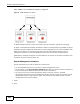
Your NWA supports SNMP agent functionality, which allows a manager station to manage and
monitor the NWA through the network. The NWA supports SNMP version one (SNMPv1) and version
two (SNMPv2c). The next figure illustrates an SNMP management operation. .